EASeJ tools: Embedding EASeJ workflows into the IDE
Shifting left to eliminate context switching and accelerate enterprise cloud deployments by 66%
PRODUCT SUITE
IBM WebSphere
KEY CONTRIBUTIONS
- UX/UI design
- Stakeholder management
- Prototyping
- User Research
- Strategy
ROLE
UX Designer
TIMELINE
Q4 2023- Q4 2024
Overview
Developers using Enterprise Application Service for Java were required to constantly switch between their IDE, GitHub, and the EASeJ platform to configure and deploy applications. This fragmented workflow reduced focus and slowed down deployments.
EASeJ Tools was created as a companion IDE extension to bring critical EASeJ workflows directly into the developer workspace.
As the sole designer, I led the product from initial discovery and early epic definition to marketplace launch. I defined the MVP experience, collaborated closely with Product and Engineering, expanding its scope from a tactical feature enhancement into the foundation for a scalable, zero context switching developer experience.
Context
Cost of context switching
Although EASeJ centralised application lifecycle management in the cloud, configuration and deployment workflows still required developers and SREs to operate across three environments: the IDE, GitHub, and the EASeJ console.
The end-to-end workflow was still fragmented. The IDE, where developers spent most of their time, was disconnected from critical deployment actions.
This disconnect limited the performance gains the platform promised and exposed an opportunity: bring deployment intelligence directly into the developer workspace.
SOME STATS
~8 context switches were required to complete a single deployment to EASeJ.
3 mins required to create the first configuration file and start the environment.
At scale, these repeated interruptions compounded into measurable productivity loss. Recognising this systemic gap, the team shifted left, embedding EASeJ workflows directly into the development and SRE environments.
Process
Taming complexity for the toughest users
Expanding limits for scalable designs
Initial feedback surfaced a valid usability issue, but the scope was narrowly defined around configuration editing. Partnering with Product Management, I conducted root cause analysis to understand the broader source of friction.
We repositioning the initiative as a workflow integration strategy that addressed multiple pain points and established a scalable foundation for future capabilities.
Working with SREs
Research confirmed that primary users of the extension would be developers and SREs responsible for deployment and environment configuration. Through interviews and collaborative sessions, I focused on understanding how SREs and developers approach their workflows. For the MVP we prioritised elevating SRE workflows.
Journey mapping and prioritisation
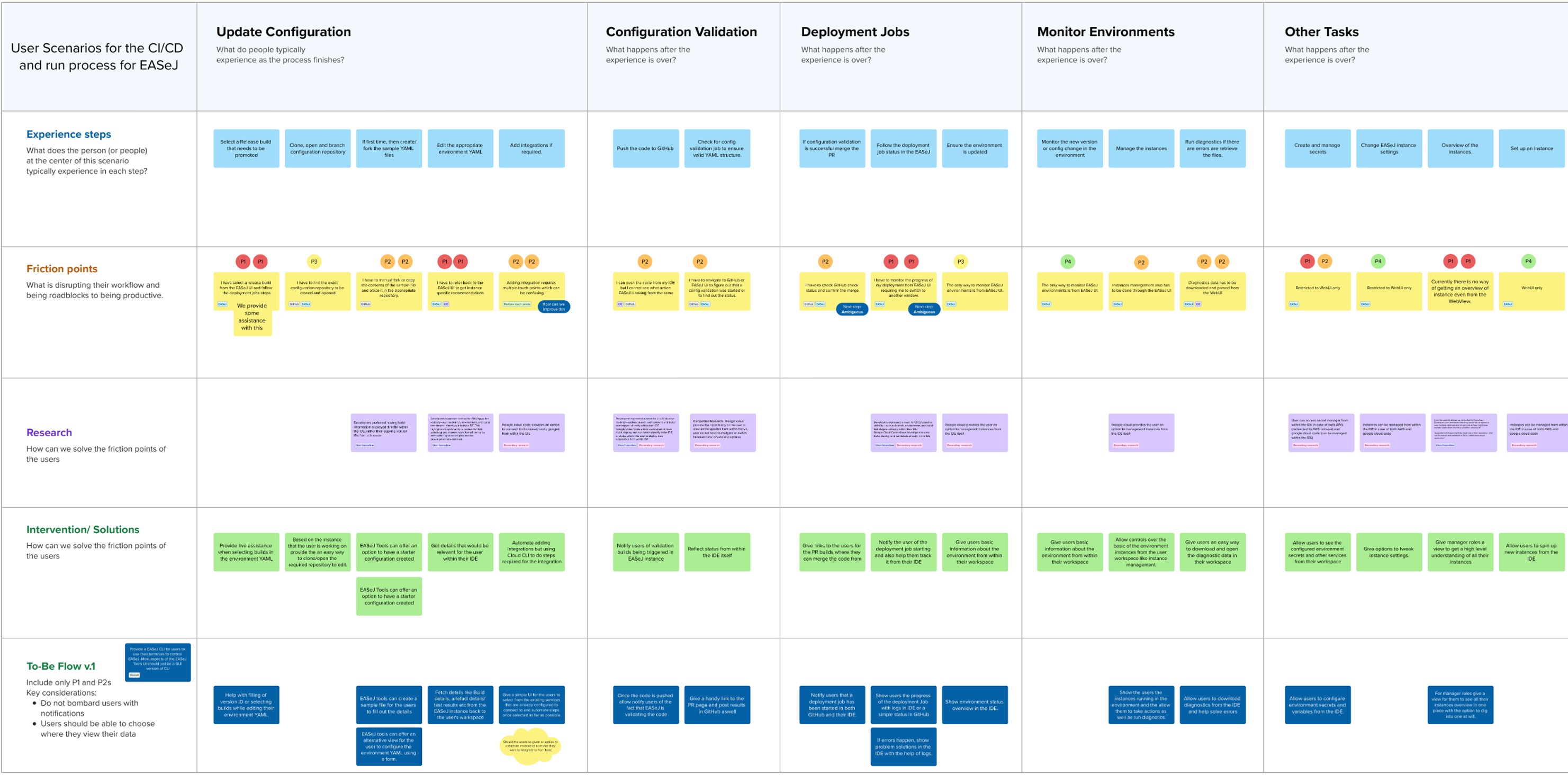
To understand where friction was most acute, I mapped the end-to-end deployment journey across staging and production environments.
We evaluated friction based on frequency, risk of misconfiguration, and impact on deployment speed. This shifted focus toward high-leverage moments within the workflow, particularly configuration creation and environment editing.
HILL STATEMENT
SREs can create and edit EASeJ configuration with real-time inline assistance that ensures accuracy, and increases confidence in the deployment process.
User flows and initial concepts
Understand, design, repeat
With scope aligned across Product and Engineering, I translated the expanded workflow strategy into structured user flows. The focused was on reducing context switching at each decision point.
Early wireframes explored how instance-level data, templates, and inline validation could surface contextually within the editor without disrupting developer flow.
Shifting left
We shifted EASeJ workflows left, bringing deployment capabilities directly into the IDE where developers and SREs interact with code. Building inside the IDE introduced structural constraints.
This required embedding validation, contextual guidance, and deployment intelligence within constrained UI patterns, ensuring workflows were integrated without disrupting developer flow.
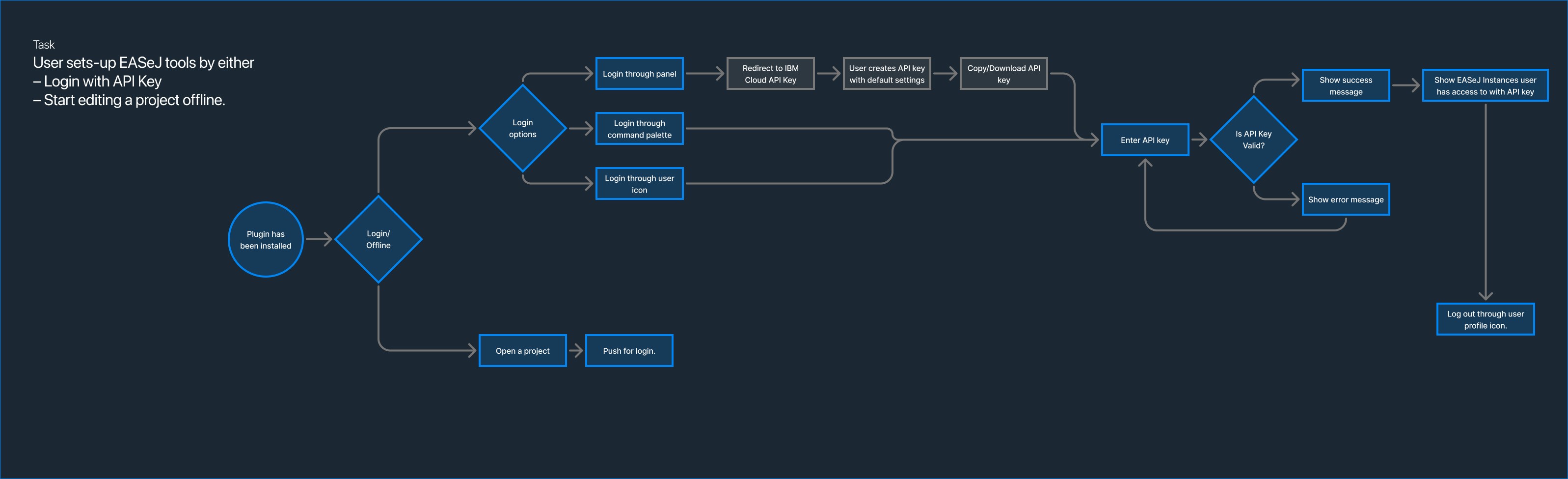
These explorations balanced efficiency for experienced SREs with clarity for newer users and established the interaction patterns that shaped the MVP experience.
Testing
Understand, design, repeat
We validated the extension with experienced EASeJ users to assess reductions in context switching and configuration errors. Testing with newer users surfaced gaps in clarity and onboarding.
Iterations balanced efficiency for experienced SREs with usability for less familiar users, ensuring the solution supported real-world deployment workflows.
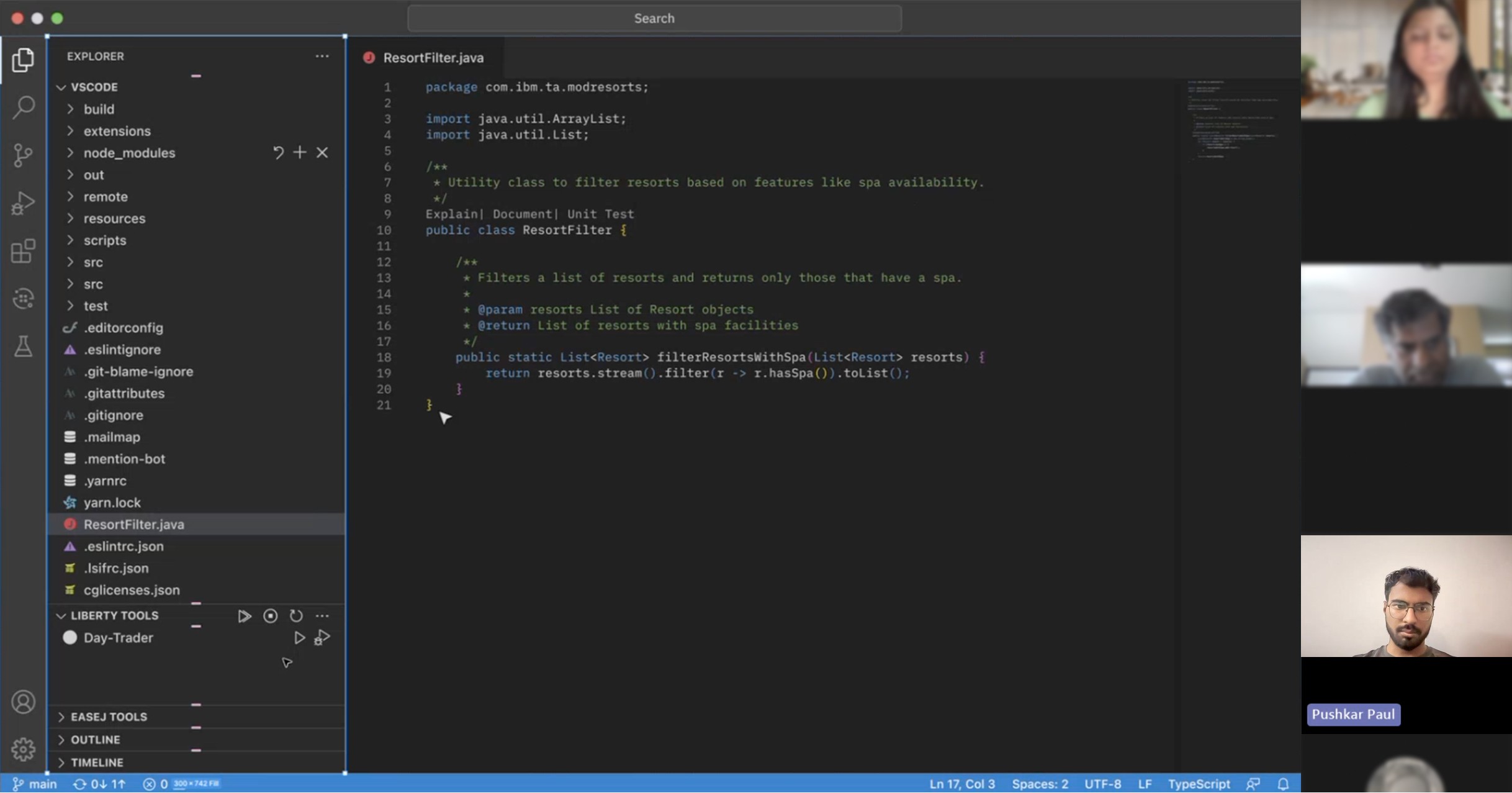
Testing surfaced areas where configuration steps felt dense. This pushed us to refine defaults, add optional overrides, and improve contextual guidance.
Final designs
A truly joint effort
The Beta for EASeJ Tools focuses on accelerating environment configuration and deployments. While these are primarily SRE tasks the solution was designed to integrate seamlessly with developer workflows as well.

SRE
As an SRE “I need to update configuration and deploy without bouncing between tools.”
Instance visibility within the IDE:
Users could view EASeJ instances and clone repositories without leaving their workspace. See all instances of EASeJ and clone repositories directly:
Template-based configuration creation:
Create configuration files instantly with a pre-made template:
Real-time inline assistance
Context-aware validation, instance-level data, and autocompletion provided immediate feedback during configuration editing. Get inline assistance with editing configuration for environments. Get instance level data and autocompletion with contextual data
Together, these capabilities transformed configuration from a manual, multi-tool process into an integrated, guided workflow within the editor.
Impact
The extension was piloted internally before being rolled out to customers and the CIO team to support cloud modernisation efforts for a Global Financing application.
The results demonstrated measurable gains in efficiency and deployment confidence:
80%
reduction in set up of initial environment configuration
66%
faster task completion rate for deployments
15%
faster deployments to environments
By embedding deployment workflows directly into the IDE, the tool reduced context switching, accelerated setup, and improved confidence in configuration accuracy at scale.
Reflections and what's next
The Beta is the foundation for EASeJ Tools bringing EASeJ workflows directly into the IDE. However, configuration acceleration was only the first step.
I partnered with a researcher to identify unmet needs across both developer and SRE workflows. The findings revealed opportunities to further consolidate deployment, monitoring, and environment management within the editor.
I developed north star concepts that extended the zero context switching strategy beyond configuration.
The direction was shared with Product Management and showcased to select users at IBM TechXchange 2025, receiving strong validation and positive feedback on the expanded vision.
This project strengthened my approach to designing within existing ecosystems. Rather than redesigning a workflow from scratch, the challenge was to embed intelligence into a tool users already trusted, elevating their experience without disrupting established habits.
Request a case study
Want to learn more about this project? Get in touch to request a case study.